
react-resizableの使い方とデモ

2026/2/11
react-resizableの使い方やデモについて余り情報がなかったので、簡単な使い方の説明とデモを用意しました。
複数のパターンを用意しましたので、ソースを見て、カスタマイズしてみてください!
デモ
デモを見せてくれれば良いと思う人もいると思いますので、下記を参考にしてみてください。
ソース
import React, { useState } from "react";
import { Resizable, ResizableBox } from "react-resizable";
import "react-resizable/css/styles.css";
const styles = {
container: {
padding: "20px",
fontFamily: "Arial, sans-serif",
},
section: {
marginBottom: "40px",
},
title: {
fontSize: "18px",
marginBottom: "10px",
color: "#333",
},
box: {
display: "flex",
alignItems: "center",
justifyContent: "center",
border: "2px solid #333",
borderRadius: "8px",
overflow: "hidden",
},
};
function App() {
const [size1, setSize1] = useState({ width: 200, height: 150 });
const [size2, setSize2] = useState({ width: 200, height: 200 });
return (
<div style="{styles.container}">
<h1>react-resizable デモ</h1>
{/* 1. 基本的な ResizableBox */}
<div style="{styles.section}">
<h2 style="{styles.title}">1. 基本的な ResizableBox</h2>
<resizablebox width="{200}" height="{150}" minconstraints="{[100," 80]}="" maxconstraints="{[400," 300]}="">
<div style="{{" ...styles.box,="" width:="" "100%",="" height:="" background:="" "#4caf50",="" color:="" "white",="" }}="">
右下をドラッグ
</div>
</resizablebox>
</div>
{/* 2. Resizable コンポーネント(状態管理あり) */}
<div style="{styles.section}">
<h2 style="{styles.title}">2. Resizable(サイズ表示付き)</h2>
<resizable width="{size1.width}" height="{size1.height}" onresize="{(e," {="" size="" })=""> setSize1(size)}
minConstraints={[100, 80]}
maxConstraints={[500, 400]}
>
<div style="{{" ...styles.box,="" width:="" size1.width,="" height:="" size1.height,="" background:="" "#2196f3",="" color:="" "white",="" flexdirection:="" "column",="" }}="">
<div>リサイズ可能</div>
<div style="{{" fontsize:="" "12px",="" margintop:="" "8px"="" }}="">
{size1.width} x {size1.height}
</div>
</div>
</resizable>
</div>
{/* 3. アスペクト比固定 */}
<div style="{styles.section}">
<h2 style="{styles.title}">3. アスペクト比固定(1:1)</h2>
<resizable width="{size2.width}" height="{size2.height}" onresize="{(e," {="" size="" })=""> {
const newSize = Math.max(size.width, size.height);
setSize2({ width: newSize, height: newSize });
}}
minConstraints={[100, 100]}
maxConstraints={[300, 300]}
>
<div style="{{" ...styles.box,="" width:="" size2.width,="" height:="" size2.height,="" background:="" "#ff9800",="" color:="" "white",="" }}="">
正方形を維持
</div>
</resizable>
</div>
{/* 4. 横方向のみリサイズ */}
<div style="{styles.section}">
<h2 style="{styles.title}">4. 横方向のみリサイズ(axis="x")</h2>
<resizablebox width="{200}" height="{100}" axis="x" minconstraints="{[100," 100]}="" maxconstraints="{[400,">
<div style="{{" ...styles.box,="" width:="" "100%",="" height:="" background:="" "#9c27b0",="" color:="" "white",="" }}="">
← 横のみ →
</div>
</resizablebox>
</div>
{/* 5. 縦方向のみリサイズ(追加) */}
<div style="{styles.section}">
<h2 style="{styles.title}">5. 縦方向のみリサイズ(axis="y")</h2>
<resizablebox width="{200}" height="{100}" axis="y" minconstraints="{[200," 50]}="" maxconstraints="{[200," 250]}="">
<div style="{{" ...styles.box,="" width:="" "100%",="" height:="" background:="" "#607d8b",="" color:="" "white",="" flexdirection:="" "column",="" }}="">
<div>↑</div>
<div>縦のみ</div>
<div>↓</div>
</div>
</resizablebox>
</div>
{/* 6. 複数のハンドル */}
<div style="{styles.section}">
<h2 style="{styles.title}">6. 複数のリサイズハンドル</h2>
<resizablebox width="{200}" height="{150}" minconstraints="{[100," 80]}="" maxconstraints="{[400," 300]}="" resizehandles="{["se"," "sw",="" "ne",="" "nw",="" "e",="" "w",="" "n",="" "s"]}="">
<div style="{{" ...styles.box,="" width:="" "100%",="" height:="" background:="" "#e91e63",="" color:="" "white",="" }}="">
全方向リサイズ
</div>
</resizablebox>
</div>
{/* 7. カスタムハンドル */}
<div style="{styles.section}">
<h2 style="{styles.title}">7. カスタムハンドル</h2>
<resizablebox 0="" width="{200}" height="{150}" minconstraints="{[100," 80]}="" maxconstraints="{[400," 300]}="" handle="{" <div="" style="{{" position:="" "absolute",="" right:="" 0,="" bottom:="" width:="" "20px",="" height:="" background:="" "#333",="" cursor:="" "se-resize",="" borderradius:="" "4px="" 0",="" }}="">
}
>
<div style="{{" ...styles.box,="" width:="" "100%",="" height:="" background:="" "#00bcd4",="" color:="" "white",="" }}="">
カスタムハンドル
</div>
</resizablebox>
</div>
</div>
);
}
export default App;
コンポーネントの種類
自分でサイズを変更させるか、自動的に変更させるかで二つ選択することができます。
Resizable
サイズの状態管理を自分で行う必要があり。
// 自分で state を管理
const [size, setSize] = useState({ width: 200, height: 200 });

<resizable width="{size.width}" height="{size.height}" onresize="{...}">
<div style="{{" width:="" size.width,="" height:="" size.height="" }}="">...</div>
</resizable>
ResizableBox
内部で状態管理してくれるので簡単に使える。
// state 管理不要
<resizablebox width="{200}" height="{200}">
  <div style="{{" width:="" '100%',="" height:="" '100%'="" }}="">...</div>
</resizablebox>
プロパティ一覧
基本プロパティ
| プロパティ | 型 | デフォルト | 説明 |
|---|---|---|---|
width |
number |
必須 | 要素の幅(ピクセル) |
height |
number |
必須 | 要素の高さ(ピクセル) |
className |
string |
'' |
追加するCSSクラス名 |
style |
object |
{} |
インラインスタイル |
draggableOpts |
object |
{} |
内部の react-draggable に渡すオプション |
リサイズ制御プロパティ
| プロパティ | 型 | デフォルト | 説明 |
|---|---|---|---|
minConstraints |
[number, number] |
[20, 20] |
最小サイズ [幅, 高さ] |
maxConstraints |
[number, number] |
[Infinity, Infinity] |
最大サイズ [幅, 高さ] |
lockAspectRatio |
boolean |
false |
アスペクト比を固定するか |
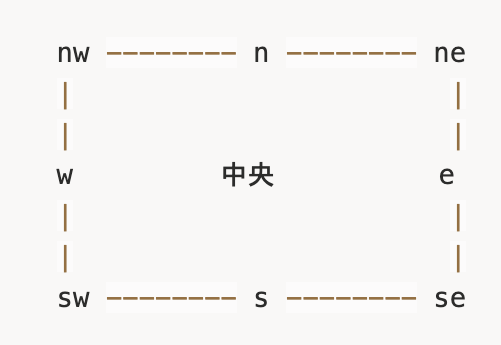
HandleAxis の値
'n' = 北(上)
's' = 南(下)
'e' = 東(右)
'w' = 西(左)
'ne' = 北東(右上)
'nw' = 北西(左上)
'se' = 南東(右下)← デフォルト
'sw' = 南西(左下)
's' = 南(下)
'e' = 東(右)
'w' = 西(左)
'ne' = 北東(右上)
'nw' = 北西(左上)
'se' = 南東(右下)← デフォルト
'sw' = 南西(左下)
視覚的に表すと:
コールバック関数
onResize
リサイズ中に連続して呼ばれる
onResize: (
  event: SyntheticEvent,
  data: ResizeCallbackData
) => void
onResizeStart
リサイズ開始時に1回呼ばれる
onResizeStart: (
  event: SyntheticEvent,
  data: ResizeCallbackData
) => void
onResizeStop
リサイズ終了時に1回呼ばれる
onResizeStop: (
  event: SyntheticEvent,
  data: ResizeCallbackData
) => void
型定義
ResizeCallbackData
type ResizeCallbackData = {
  node: HTMLElement;      // リサイズされているDOM要素
  size: {
    width: number;        // 新しい幅
    height: number;       // 新しい高さ
  };
  handle: HandleAxis;     // どのハンドルでリサイズしているか
};
HandleAxis
type HandleAxis = 'n' | 's' | 'e' | 'w' | 'ne' | 'nw' | 'se' | 'sw';
まとめ
| 用途 | 使用するプロパティ |
|---|---|
| サイズ制限したい | minConstraints, maxConstraints |
| 一方向だけリサイズ | axis="x" または axis="y" |
| 複数方向からリサイズ | resizeHandles={['se', 'sw', 'n', ...]} |
| アスペクト比固定 | lockAspectRatio={true} または onResize で計算 |
| 見た目をカスタマイズ | handle={<CustomElement />} |
| 拡大縮小された親内で使用 | transformScale={スケール値} |
| リサイズイベントを取得 | onResizeStart, onResize, onResizeStop |